VIDEO TO FRAMES · DIMENSIONS GUIDE
Do video frames keep the original resolution?
The short answer
Usually, an extracted frame keeps the decoded video picture’s pixel dimensions. A preview shown smaller in a web page is only a display scale. Check the saved image’s pixel width and height to know its actual resolution; a larger export cannot restore detail missing from the source.
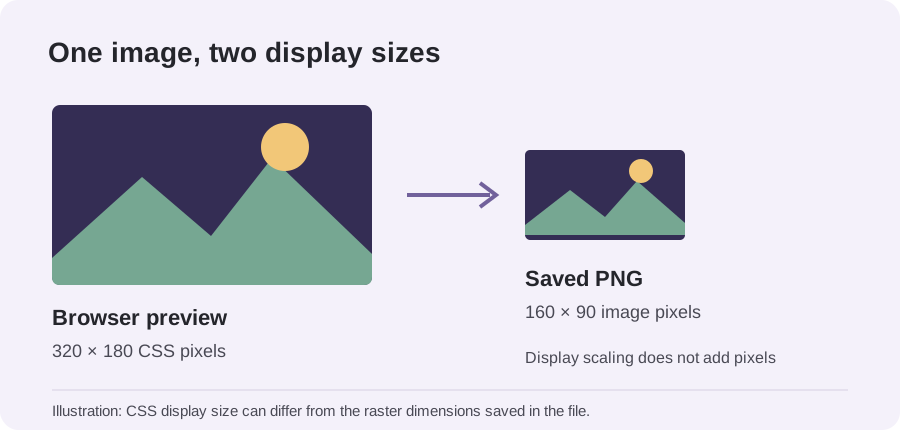
Why the preview can look smaller
A browser fits a decoded picture inside the available preview box so it does not overflow the page. That changes how large it looks on screen, not the width and height stored in the exported image. The reverse is also possible: CSS can enlarge a preview, but extra screen area does not create new source pixels.
Resolution is a pair of pixel counts, such as 1920 × 1080. It describes the decoded picture’s raster dimensions, not sharpness by itself. Focus, motion blur, compression, upscaling before export and the size of your display all affect perceived detail. A 4K-labelled file may contain a smaller picture scaled up, so dimensions alone do not prove native detail.
Check the actual exported image
- Download one frame rather than judging the page preview.
- Open the image’s file information or properties and read pixel dimensions.
- Compare those numbers with the video’s decoded frame size. The browser reports intrinsic dimensions; pixel aspect ratio or clean aperture can make displayed proportions differ from the raw raster.
- If dimensions match but the result looks soft, inspect the source at the same moment and the viewer’s zoom before changing export format.
This order separates size from quality. First compare pixel counts; then inspect the same content at a one-to-one zoom. Otherwise a 160-pixel preview stretched across a wide panel can look soft even when the downloaded file is intact.
What our sample confirms
In a retained browser export using a locally generated 160 × 90 synthetic H.264 clip, the downloaded PNG files were also 160 × 90. That observation confirms matching dimensions for that sample and browser run only. It is not a test of every codec, device, rotation flag or video service.
For a sample-count test, see how many images a video to frames export creates. For format trade-offs, read PNG vs JPG for video to frames. Open the local frame extractor.
When dimensions do not match
Check whether the file-information panel reports coded dimensions, display dimensions or a rotated view. Then test a short range and inspect the saved file rather than inferring size from a contact sheet. If you report a mismatch, include the source dimensions, exported dimensions, browser and codec; those details make it possible to distinguish scaling from display or metadata behavior.
Reference
MDN: HTMLVideoElement.videoHeight explains how intrinsic dimensions relate to raw pixel dimensions, aspect ratio and clean aperture.