VIDEO TO FRAMES · DOWNLOAD TROUBLESHOOTING
Video to frames: confirm the images were saved
The short answer
If you can see frame thumbnails but cannot find the images, use Download all .zip and check your browser’s download list. Open the ZIP and count image files; then inspect a PNG or JPG. A thumbnail shows an image was generated in the page, not that a file was saved.
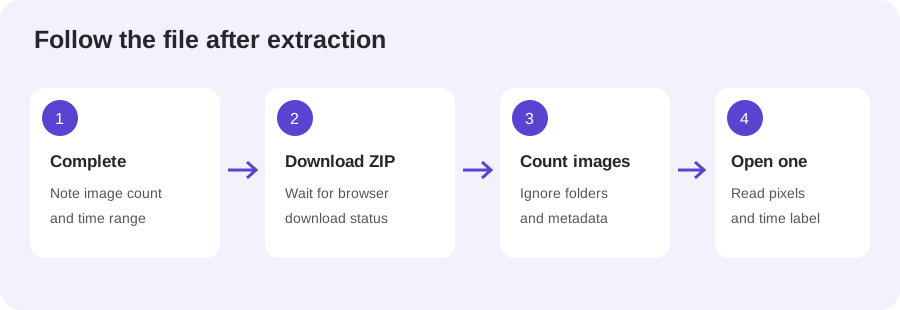
Follow the download from result to file
- Wait for a Complete status and note the finished image count.
- Select Download all .zip and wait for the browser to report that the download started or completed.
- Open the browser download list and locate the ZIP by its filename and time.
- Open the archive and compare its image entries with the completed count; then open one picture.
This order separates the extraction result from file delivery. The page can hold generated images in memory before the archive is written. If the browser download never appears, the problem is at the save step; if it appears but will not open, inspect the archive itself before repeating a long decode. A green or complete message alone does not prove both steps succeeded.
What our browser run actually saved
On 29 October 2026, Chrome 155 on this Windows 11 workspace loaded a locally generated three-second H.264 clip at 160 × 90 pixels. PickVideoFrame read six source frames. With PNG selected and an interval of one second over [0, 3), the page completed three images at 00:00, 00:01 and 00:02.
The downloaded ZIP measured 38,955 bytes. Its three entries were PNG files, each with a 160 × 90 header; their names contained the three requested times. This was a rerun of the retained synthetic test: the archive hash matched the 24 October archive exactly. It reproduces that one case and is not a new independent sample, a GIF-input test, or a forecast for larger videos.

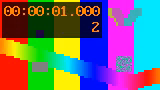
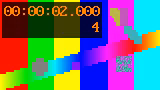
The archive count matched the completed card count, and the filename sequence stopped at two seconds because the range end at three seconds was exclusive. Those two checks answer different questions: count agreement checks delivery of the requested samples, while filenames help relate entries to the sampling plan. Neither proves that every source frame was selected or that all browsers save every archive reliably.
If the ZIP or image seems wrong
When the count differs, compare image entries only and ignore folders or archive metadata. When a filename looks missing, sort by its numbered sequence before concluding that an image was skipped. When the file opens at a smaller size than the video preview, read its pixel dimensions rather than judging its on-page display size.
A single opened image confirms that at least one archive entry is readable; it does not validate the whole sequence. For a more careful spot check, open an early, middle and late image, then compare their timestamp labels with your selected interval. If only the final moment matters, use Single frame because a range ending at 3 seconds does not request an image at 3 seconds.
PickVideoFrame exports each selected frame as PNG or JPG and can bundle the results into a ZIP. It does not make an animated GIF. Choose PNG for its lossless image encoding, or JPG when you prefer the smaller-file option. Changing the still-image format does not turn the sequence into an animation.
Where the archive is stored
If the browser reports a download but the file is not obvious, open its downloads list and use the recorded filename to reveal it in the system file manager. Check the destination folder shown by that browser rather than assuming every browser uses the same path. If the download was cancelled or blocked, repeat only the save step while the results remain on the page.
For the full archive checklist, read how to check a video-to-frames ZIP. To export frames, open PickVideoFrame and start with a short range you can verify.
References
MDN: HTMLCanvasElement.toBlob() documents PNG as the required canvas export type and notes that JPG may also be supported. MDN: image file types describes GIF as an image format that can contain animation, distinct from separate still PNG or JPG files.
Method: one local synthetic H.264 clip, one completed browser export rerun, the downloaded ZIP and PNG headers independently inspected. No private footage or physical-phone test. The rerun hash matched the retained 24 October test archive.