PRACTICAL GUIDE · 2026-10-25
Why do video frames look washed out?
The short answer
If extracted frames look washed out, compare the same moment in the video preview and the saved image in a color-managed viewer. Check whether the source is HDR, then compare on the same display with HDR settings unchanged. PNG avoids extra lossy compression; it cannot restore highlight or color information already changed during video-to-canvas rendering.
Follow the color path in order
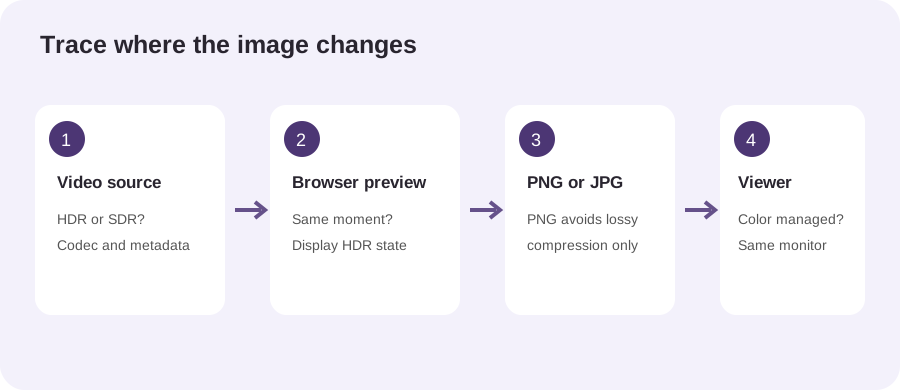
A frame is not a direct copy of the video file’s encoded bytes. The browser first decodes a video picture, applies its display pipeline and makes pixels available to the page’s rendering path. The extractor then encodes those pixels as PNG or JPG. A viewer and display render the resulting file again. A visible difference can arise at more than one step, so changing PNG to JPG is not a complete color diagnosis.
Start by pausing on a clear, colorful moment and comparing that exact moment with the exported image. Use the same monitor and avoid comparing a video player on one screen with an image viewer on another. Different brightness, night-light, HDR, picture modes and ambient-light adaptation can make an unchanged file appear different. Record these settings before changing them; otherwise a second variable can hide the first.
Next identify the source as SDR or HDR if you can. HDR video can describe brightness and color beyond a conventional SDR image. An export path that draws video into a canvas may map or constrain those values. Chrome’s documentation describes canvas output as SDR in the standard WebGPU mode, while MDN documents the color-space metadata available on VideoFrame. These facts explain why an HDR preview and a PNG need not look identical; they do not predict the result for every browser, codec or operating system.
PNG is lossless with respect to the pixels it receives. That means it does not add the same lossy image compression as JPG, but it does not mean the saved pixels preserve every property of the original video. If tone mapping or color conversion happened before encoding, a lossless file faithfully stores that converted result. A higher JPG quality setting also cannot recover values that are no longer present.
A quick check you can reproduce
- Use the same file and timestamp for preview and export.
- Save one PNG; keep the original video untouched.
- Open the PNG in a color-managed viewer on the same display.
- Repeat with HDR enabled or disabled only if your device exposes that setting, recording which state you used.
- For a useful report, note browser and version, operating system, display HDR state, source codec and whether the mismatch appears in the preview, the exported file or both.
Changing one setting at a time makes the result interpretable. If the preview already differs from a trusted reference, investigate decoding or display configuration first. If the preview looks right but the exported file does not, the rendering-to-image path deserves attention. If the file looks different only in one viewer, compare its color-management behavior before concluding that extraction altered the image.
Do not use a screenshot of the video player as a color reference: screenshots capture the composed screen, which may include display tone mapping and interface effects. A stronger test uses a known SDR color chart or a source whose expected pixel values are documented, then compares decoded samples with a tool that reports color values. Our quick browser check below verifies a synthetic SDR clip can be decoded and exported; it is not a colorimetric measurement.
What we checked
On 25 October 2026, we loaded a locally generated three-second SDR test pattern into the PickVideoFrame browser tool and completed an interval export. The tool reported six source frames and exported three PNG images at 160 × 90 pixels. The run confirms that this synthetic clip decoded and produced the expected number and dimensions of images on this test setup. We did not compare pixel values, test HDR footage, or test another device; it does not establish color fidelity.
The site notes that HDR-to-canvas color rendering depends on the browser and original HDR color fidelity is not guaranteed. For format choice, read PNG vs JPG for video to frames. For codec compatibility, see extract frames from MP4. Open the local frame extractor.
References
- Chrome for Developers: HDR support with canvas tone mapping mode — describes standard SDR and extended HDR canvas modes.
- MDN: VideoFrame colorSpace — describes metadata exposed by the WebCodecs VideoFrame interface.
- MDN: HTMLCanvasElement getContext() — documents canvas color-space context options.
References explain browser APIs; the test counts above come from our own run.